DoliSCAN 2.2.26: documentation for every setting, and no more expenses lost in silence
Version 2.2.24 focused on security. Version 2.2.26 tackles what happens between the smartphone app and the accounting: how each module setting transforms a receipt into a vendor invoice or an expense report line, and what happened when a setting was missing.
Setup, documented tab by tab
DoliSCAN is configured in eight tabs, and the most frequent question for support was "What exactly does this option do?". Each tab now has its own documentation page, illustrated and described option by option: what it does, its default value, and what happens if it is not filled in.
Each module setup page has an Online Documentation link next to its title: it directly opens the page for the displayed tab.
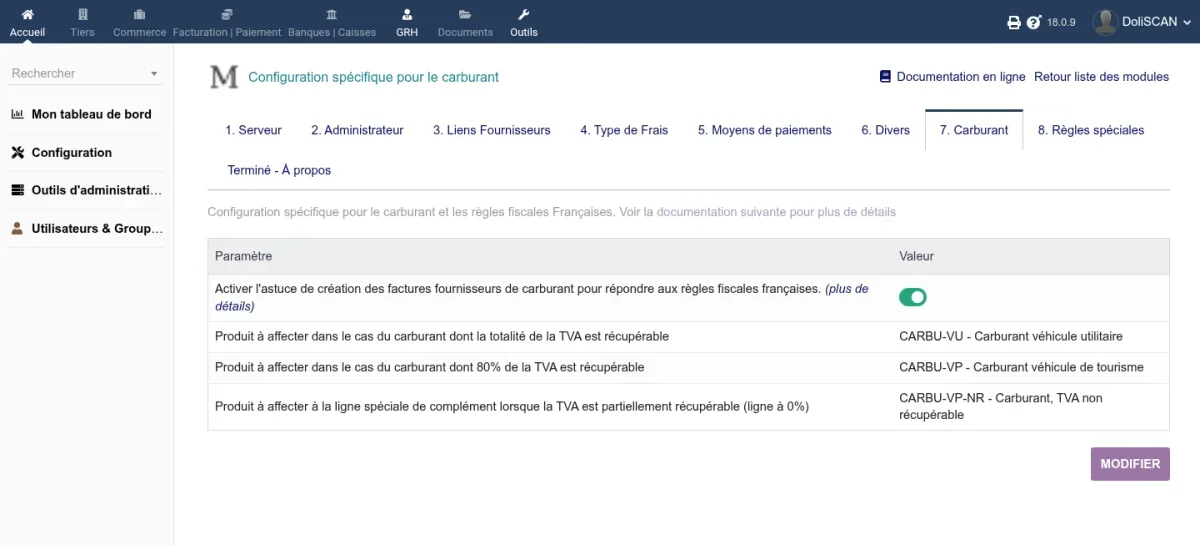
The fuel tax rule is explained with a numbered example. For a 48 EUR fill-up for a passenger vehicle, where VAT is only 80% recoverable, the module creates a 38.40 EUR line with 6.40 EUR of deductible VAT, and a supplementary line of 9.60 EUR without VAT. The total fill-up amount does not change, only the recoverable portion is declared.
No more expenses lost in silence
An expense whose type was not associated with anything in the setup disappeared without warning. Paid with a company card, it was not imported and only the Dolibarr technical log kept a record. Paid by the employee, it became an expense report line without a valid type. In both cases, the report was then considered processed: correcting the setup never recovered the expense.
The synchronization report now names the expense and the tab to complete, the synchronization is counted as an error, and the report remains open. Once the association is made, the next synchronization imports the expense.
Settings that do what they claim
- Fuel: a fill-up without a vehicle type resulted in a vendor invoice with no lines, and a company not subject to VAT saw the import stop. These fill-ups are now processed as ordinary expenses;
- Company card per user: an empty line erased the bank account from the general setup. It now only replaces what it specifies;
- Expense type lists: they were only downloaded once, a type added on the server never appeared. They now follow the server with every change;
- Server selection: the production server, which is billed, is no longer saved by default on the first visit to the tab;
- Closed projects: the option that was supposed to hide them in the app had no effect. It now works;
- External users: automatic account creation, which is billed, no longer creates accounts for them when the option prohibits it;
- Meal allowances: a group removed from the list continued to cap its members, and cents from an allowance were lost. With multiple groups, the lowest cap applies;
- Diagnostics: replacing the vendor of an invoice requires confirmation;
- Multi-company: an account renewed from one company is no longer moved to the user’s assigned company, where its expense reports incorrectly appeared;
- Receipts with multiple VAT rates: a line could receive one cent less VAT than the receipt. Each rate now keeps exactly its VAT;
- Translations: the page for recovering missing expenses is translated, and payment methods appear in the user’s language.
After the update
No reactivation or new permissions are required. Open the Vendor Links, Expense Type, and Payment Methods tabs, click Edit to retrieve the updated lists, and associate each type: an unassociated type is now reported with every synchronization.
Compatibility
DoliSCAN 2.2.26 requires Dolibarr 18 or higher and PHP 7.4 or higher. The module’s static analysis is verified on Dolibarr 18 to 23.
User documentation is available at doc.cap-rel.fr/doliscan, and the new features for this version at doc.cap-rel.fr/doliscan/nouveautes-2-2-26.
Other languages: Deutsch, Español, Français, Italiano, Nederlands, Polski, Português