CapCowork: rates entered now saved on Dolibarr 20+, Day view in the schedule, and four new languages
Install now on Dolibarr 20 and later
On Dolibarr 20 and later versions, amounts entered in cards were lost on save: hourly, half-day, daily, and monthly rates for a space, its area, the price of a listing, and the amount of a subscription were reset to zero. These values are now read as Dolibarr reads its own amounts, including the decimal comma. If affected, check your spaces and subscriptions rates after the update, then re-enter those that are zero.
The generation of a day pass now works again on Dolibarr 24, where its button was rejected due to a missing security token, and confirming a booking from its card no longer stops while notifying the co-worker.
The schedule, day by day
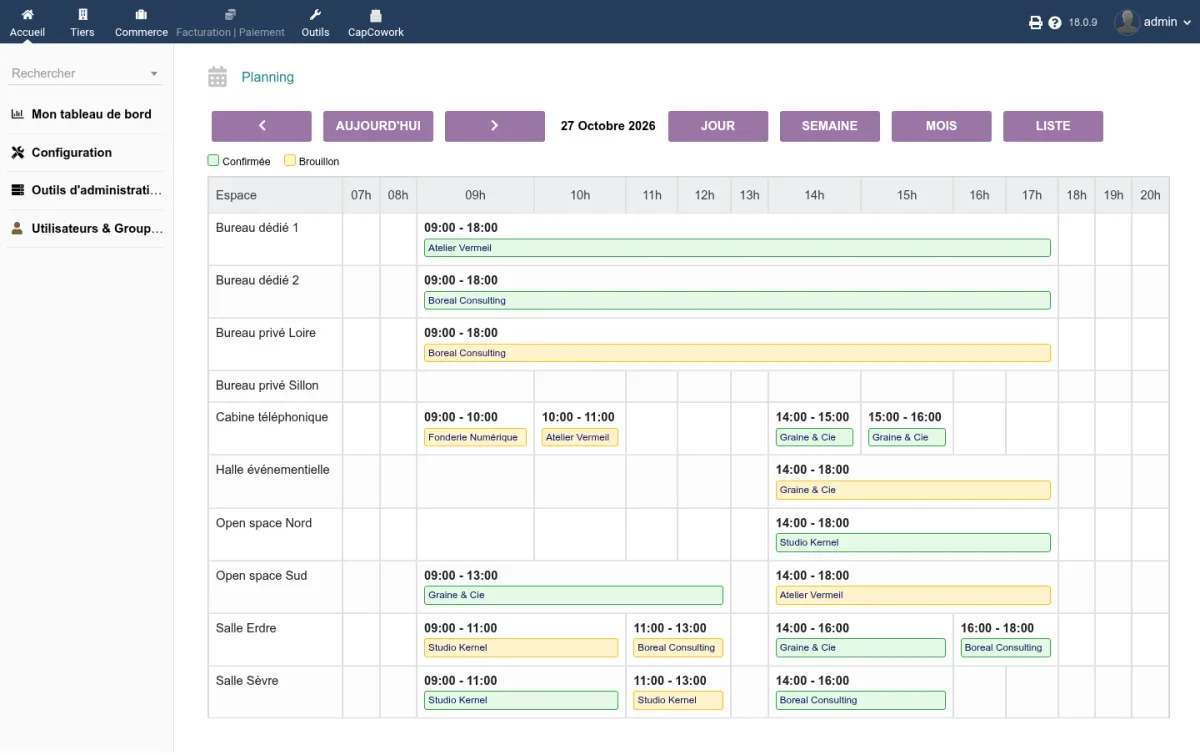
The schedule gains a Day view: one line per space, one column per hour, and each booking at its time with the co-worker’s name. The week now aligns on Monday, a legend explains the colors, and cancelled bookings no longer clutter the grid.
Bookings, spaces, and co-workers
- The deposit invoice is generated from the booking card, and the two cards link to each other.
- The equipment for a space is selected from a dictionary that you complete yourself. The dictionaries for space types, equipment, and listing types are now saved correctly.
- A co-worker receives an end date upon creation, and a badge marks those whose membership has expired. Those with no history can be deleted, others are set to Former co-worker status.
- The visitors list displays arrival and departure times, the subscriptions list shows automatic renewal, and the listings list includes a filter by type.
- Creation buttons no longer appear for users who can only view a list.
Four new languages
The interface is now available in German, Italian, Dutch, and Brazilian Portuguese, in addition to French, English, and Spanish. The requests screen also displays its message label on Dolibarr 18.
Reliability
- The portal published on an address with a port no longer loops endlessly.
- Values on the setup page no longer gain stray characters on save.
- The dashboard and space availability log their errors instead of displaying zero, and a failed scheduled task explains why.
- Booking and portal emails are no longer sent in duplicate, and no email is sent to demo cards.
- Module activation now refuses to complete if one of its tables could not be created, instead of failing later far from the cause.
Try it
Try CapCowork on a Dolibarr installed in under 20 seconds, with a pre-filled coworking demo space: dolitry.fr/capcowork
Update
Install the new version, then deactivate and reactivate the module. On a
test installation using the demo dataset, set the constant
CAPCOWORK_ALLOW_DEMO_DATA to 1: the demo page now refuses to act on a production installation. Compatible with Dolibarr 18 to 23.
Other languages: Deutsch, Español, Français, Italiano, Nederlands, Polski, Português