Capmail 2.0.6: your emails sort themselves, and each email becomes a case
What this release brings
Capmail integrates your mailboxes into Dolibarr and files each message on the right customer card, alongside their commercial proposals, invoices, and projects. Version 2.0.6 is the richest since 2.0: emails sort themselves upon receipt, the webmail has been redesigned to handle a request rather than just read it, and the module now supports Google and Microsoft 365 mailboxes.
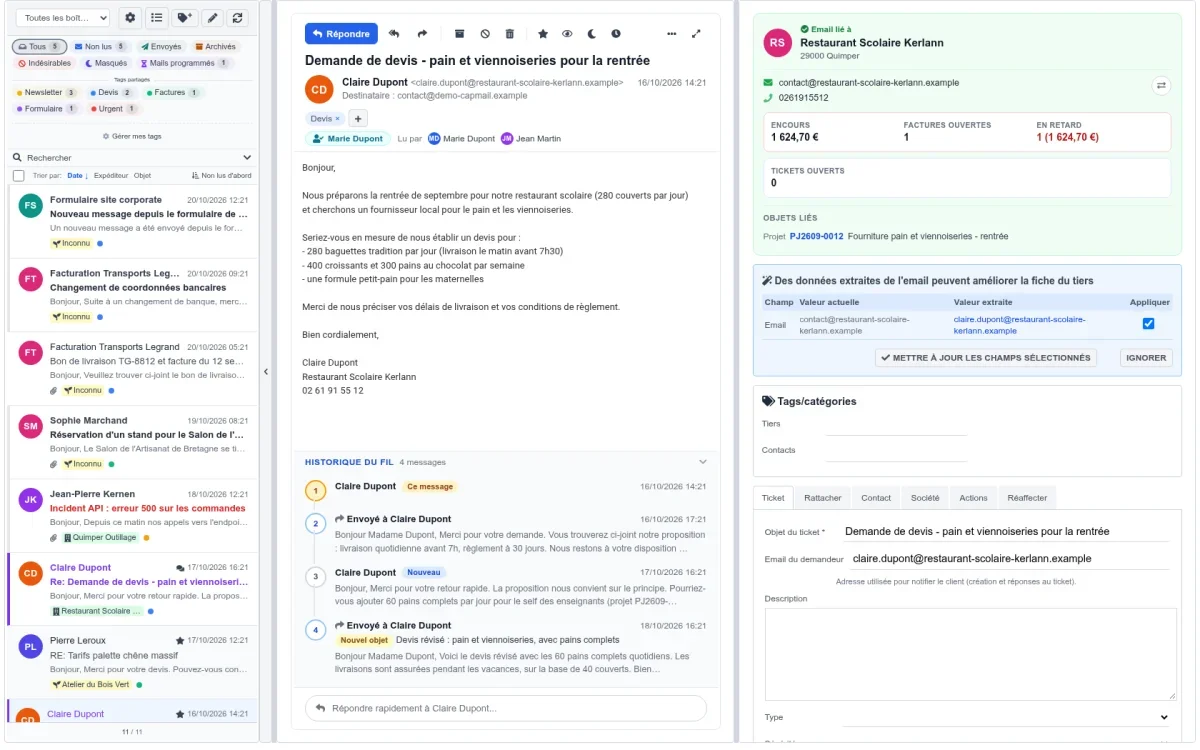
Filters that sort your emails for you
A filter consists of conditions and actions, applied to each email as it arrives.
What to filter on. The sender (address, name, or domain), the subject, the body, a specific header, recipients, the name or number of attachments, the message size, the mailbox. Plus four simple questions: does the email have an attachment, is the sender known in Dolibarr, is the email already linked to a third party, is it a reply. Case and accents are ignored: a rule for "resiliation" also catches "Résiliation".
What a filter can do. Mark, star, label, add a note, make the email private; link it to a third party or a project; create a ticket, a third party, or a project; reply with a template, forward, notify a colleague; put on hold, archive, move, flag as spam, or delete. The third party, project, user, or template is selected from a list with search.
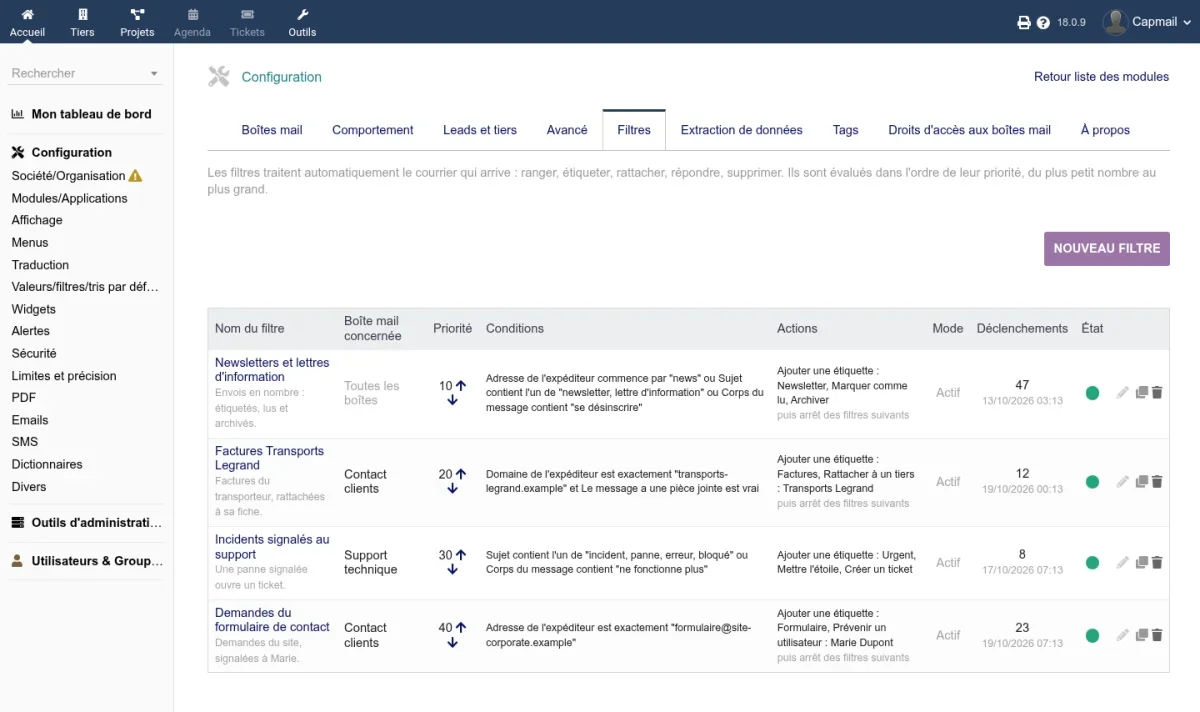
Test before enabling. A filter that deletes emails deserves verification. The dry-run test lists, even before saving, the already received emails the filter would have caught. Observation mode lets it run for real without making changes, counting its triggers. And filters can be replayed on already received emails: all, a single filter, or a selection of emails.
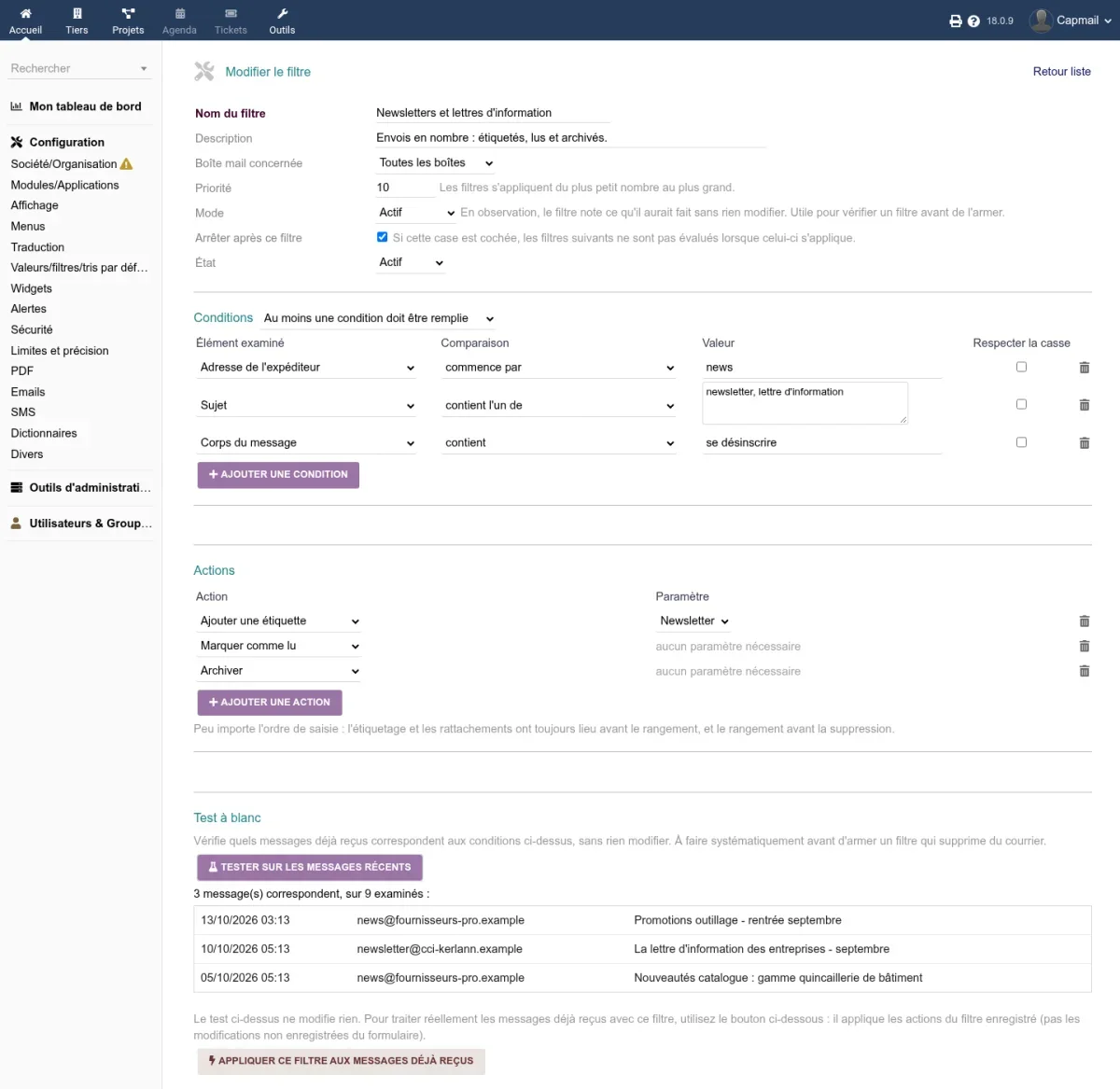
Each user has their own filters. In addition to company filters, each user manages their own in the "My filters" tab, limited to mailboxes they own: no one can make a colleague’s emails disappear on a shared mailbox.
From an email to a case, in a few clicks
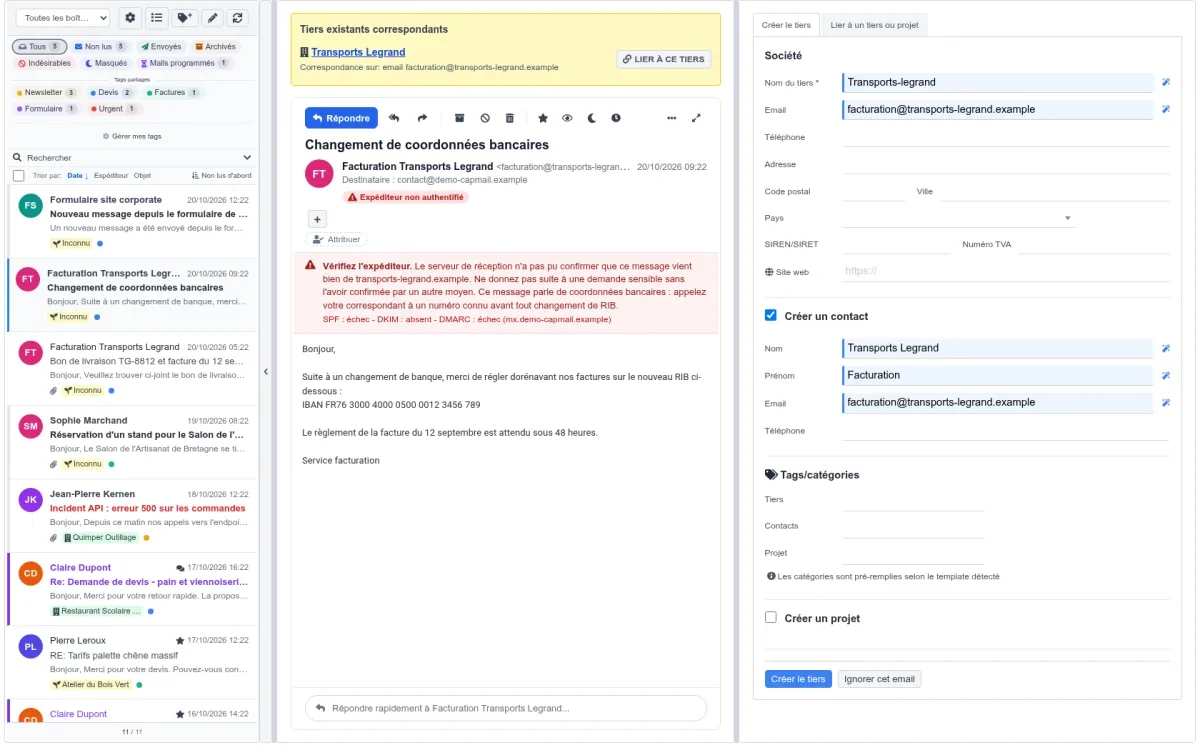
A prospect writes from your website’s form. Name, phone, company, address, and website are read from the message, any duplicate is flagged, and the third party, their contact, and their project are created in one action, with categories set automatically.
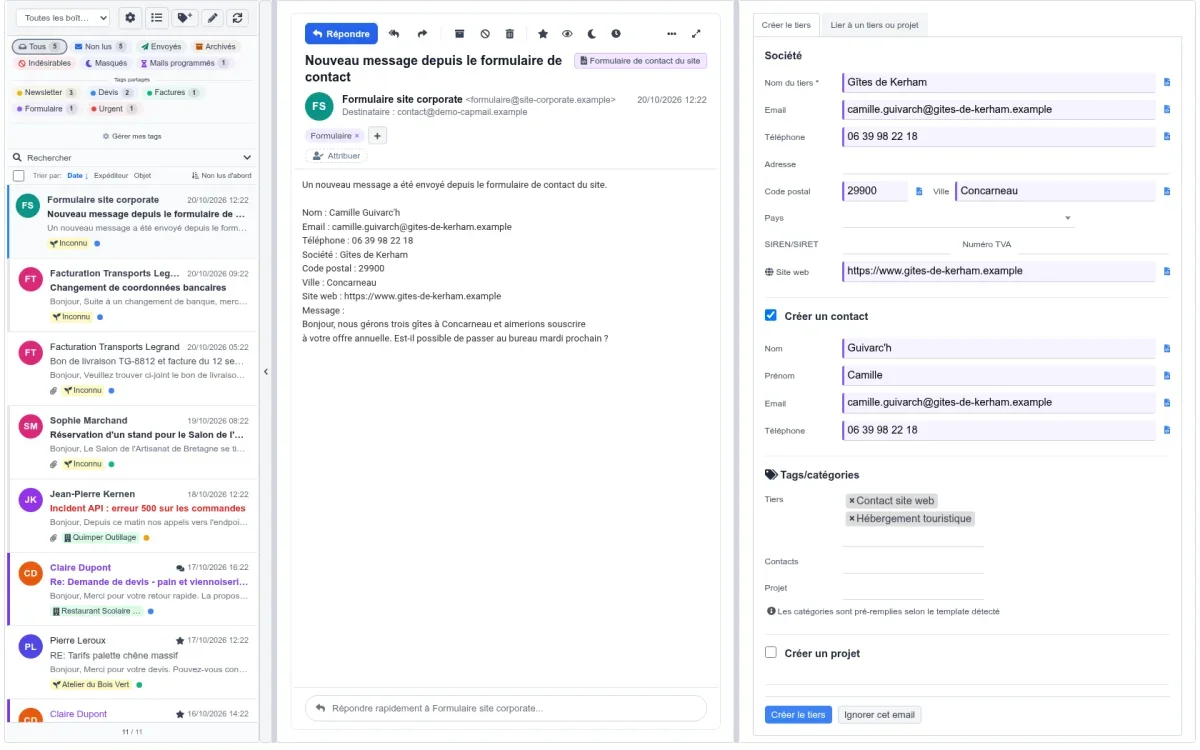
A customer reports a breakdown. The ticket is created with its attachments.
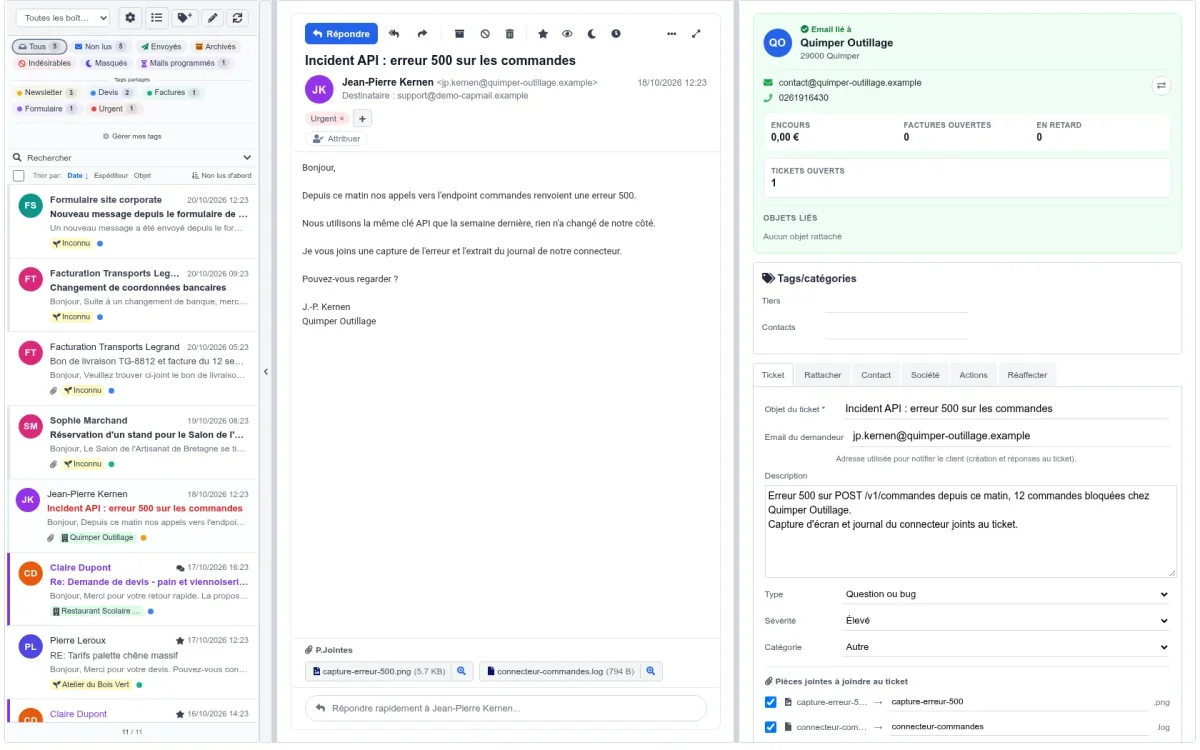
An email mentions a commercial proposal, an order, or a project. Capmail recognizes Dolibarr references in the message, opens them, and attaches the email in one click. An email can also be manually linked to a project, a commercial proposal, an order, an invoice, or a ticket, with attachments copied: it then appears in the "Linked objects" of the object. And when a customer replies to a commercial proposal sent from Dolibarr, their response is automatically filed under the correct proposal.
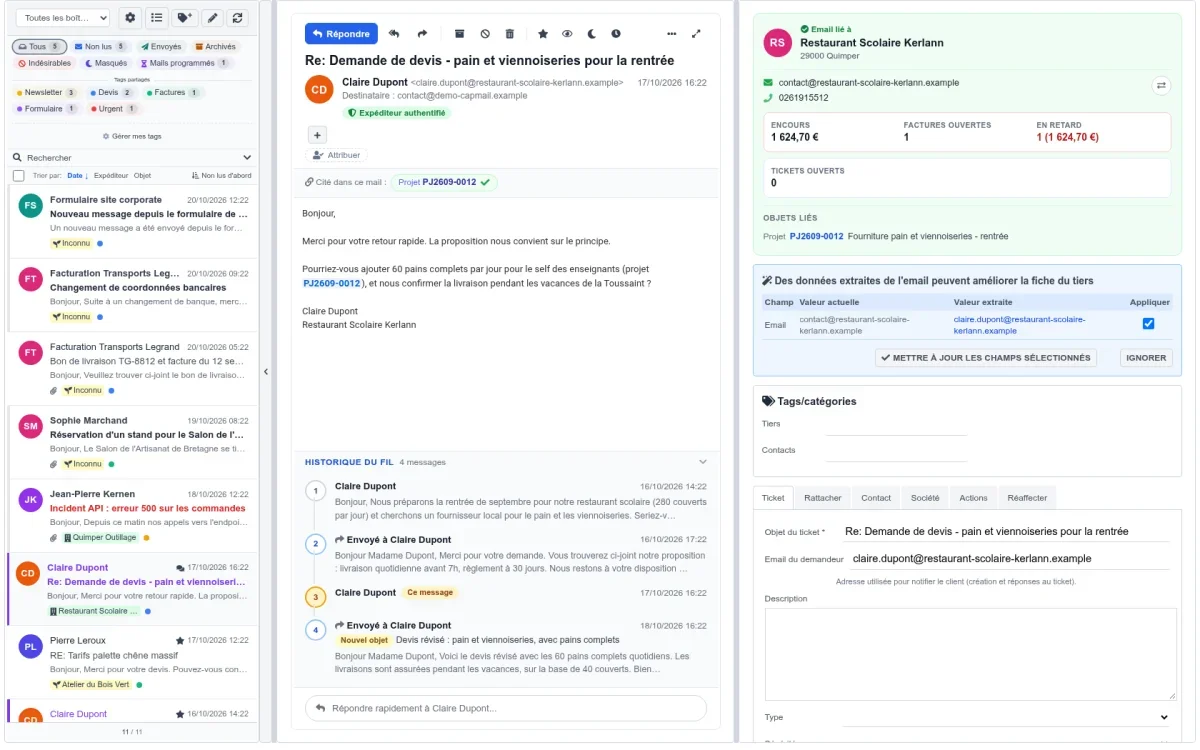
The customer is already known. The right-hand panel first shows what matters: their outstanding balance, overdue invoices, open tickets, or prepaid time for a technician, and objects linked to the email. Paste an address, name, or phone number in the "Link" tab: the corresponding third party is suggested. And on the customer card, the exchanges tab is displayed as conversations, with a summary and linked objects.
A webmail designed to handle, not just to read
- Common actions at the front of the bar, the rest in a "More" menu
- A quick reply under the email, without opening the full form
- The entire conversation thread under the email, numbered, each subject change flagged; an email that drifts to another customer is filed separately
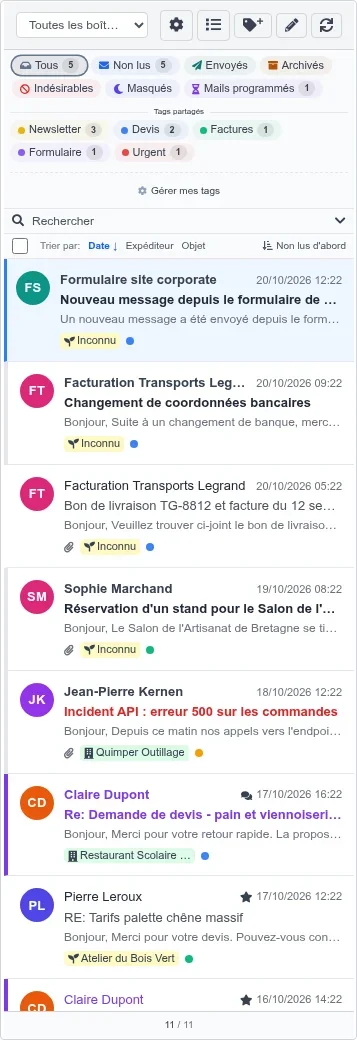
- The initials of each sender in the list, with the first line of the email; a click on the initials selects the email
- Conditional formatting: your important customers, an alert, or a recurring subject stand out in color in the list
- On a shared mailbox, who has read the email, and assignment to a colleague
- A click on the "Unknown" badge lists all emails without a third party
An alert against bank details fraud. When the receiving server could not confirm the sender, Capmail flags it, and even more strongly if the message mentions bank details: call your contact at a known number before changing anything.
Write and reply without leaving Dolibarr
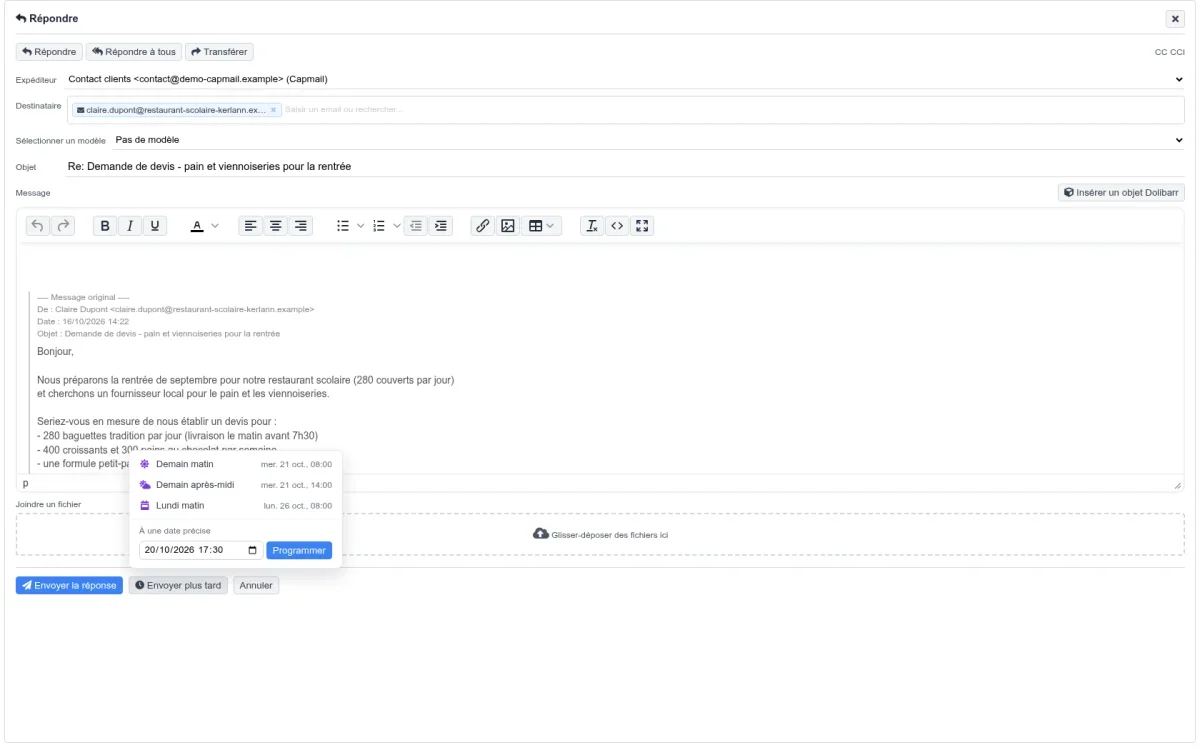
- Scheduled sending: tomorrow morning, Monday, or on your chosen date
- Insert a commercial proposal, an order, or an invoice into an email, with its lines, attached PDF, and online signature link
- Attach files to a reply, not just to a new message
- Forward an email with its attachments, without marking it as replied
- A single editor everywhere, embedded in the module, with no scripts loaded from a third-party site
Your mailboxes, from Gmail to Microsoft 365
Adding a mailbox now only requires its address and password: servers are detected automatically, and company domains are preconfigured. Google, Google Workspace, Outlook.com, and Microsoft 365 mailboxes now connect via OAuth, without a password, using Dolibarr’s OAuth module: this was the only possible route with Microsoft, which has closed password-based connections.
The dedicated window, or Capmail as an application
The webmail opens in its own window, full screen, without Dolibarr’s menus. Chrome and Edge then offer to install it as an application: it appears in the device’s application menu and opens directly to your inbox.
In your language, on Dolibarr 24
Capmail now speaks German, Spanish, Italian, Dutch, and Brazilian Portuguese, in addition to French and English, and field labels finally display in the user’s language. The module works from Dolibarr 18 to Dolibarr 24, no longer requires the PHP IMAP extension, and weighs 1.7 MB instead of 3.1.
More secure, from the screen to the mobile app
- Deleting emails requires a dedicated right, everywhere, including the API
- A colleague’s private emails remain out of reach, even via a direct link
- A conversation thread only links and displays emails you can see
- Counters only count emails you can open
- The mobile app applies the same templates, searches, and access controls as the webmail
And dozens of fixes
Replies and forwards from an email card now include their text again. Markers set from the card and the read status of an ignored email are sent to the server. "Cancel" is offered after archiving from the bar buttons. Detection patterns for a template remain one per line when modified. Two attachments with the same name are both kept. A mailbox that does not respond is no longer hidden by a scheduled task that claims success. The full list is in the changelog.
Update
Replace the module files, then deactivate and reactivate it: new tables and columns are created on reactivation, no existing configuration is modified.
Remember to grant the new "Delete Capmail messages" right to users who need to delete emails: without it, the button disappears.
Requirements: PHP 8.0 or higher with iconv and mbstring extensions, present on almost all hosting services. The IMAP extension is no longer necessary.
Try it
Try Capmail on a Dolibarr installed in less than 20 seconds, with demo mailboxes already filled: dolitest.fr/capmail
User documentation, one page per task: doc.cap-rel.fr/capmail
Alte limbi: Deutsch, Español, Français, Italiano, Nederlands, Polski, Português